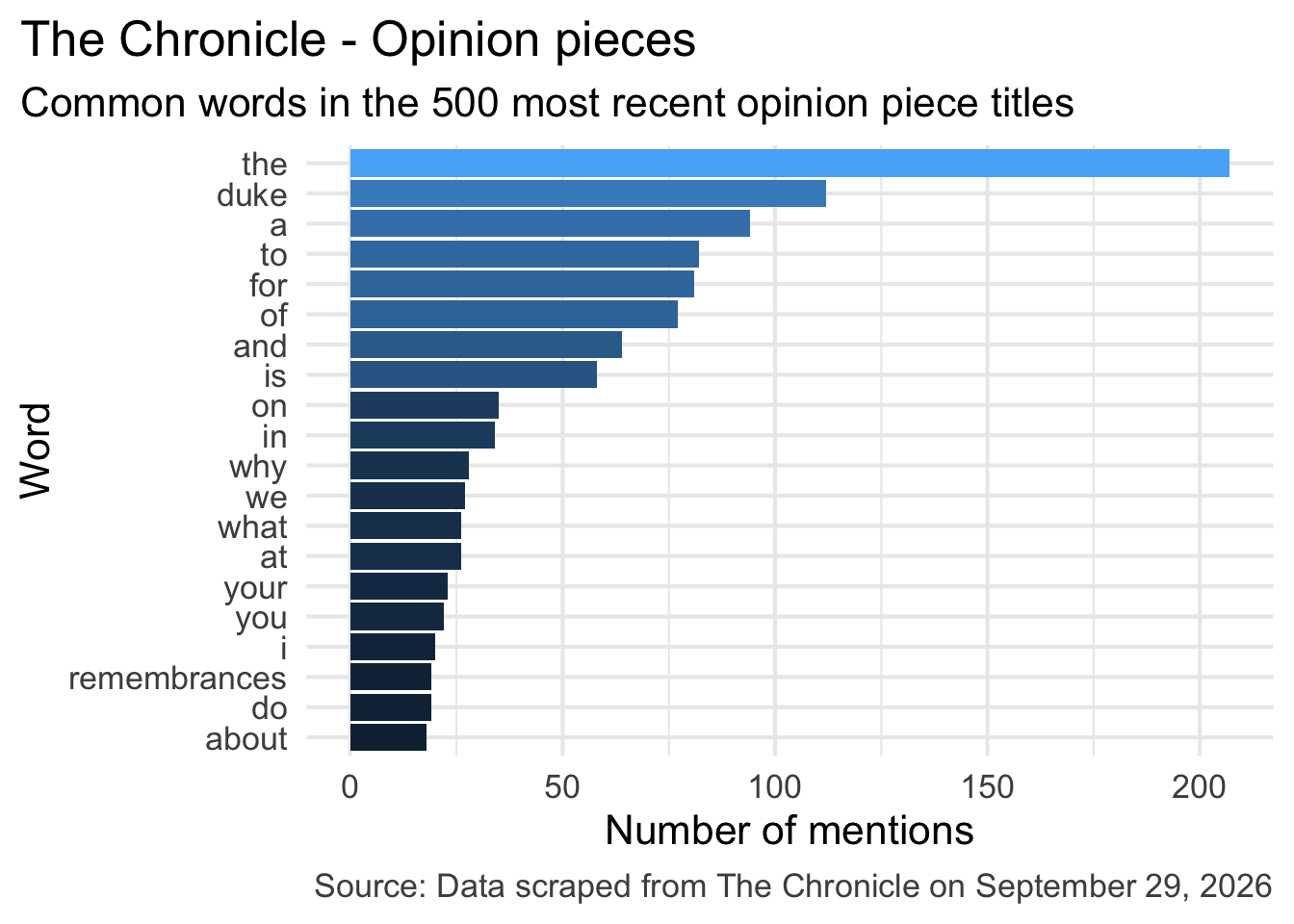
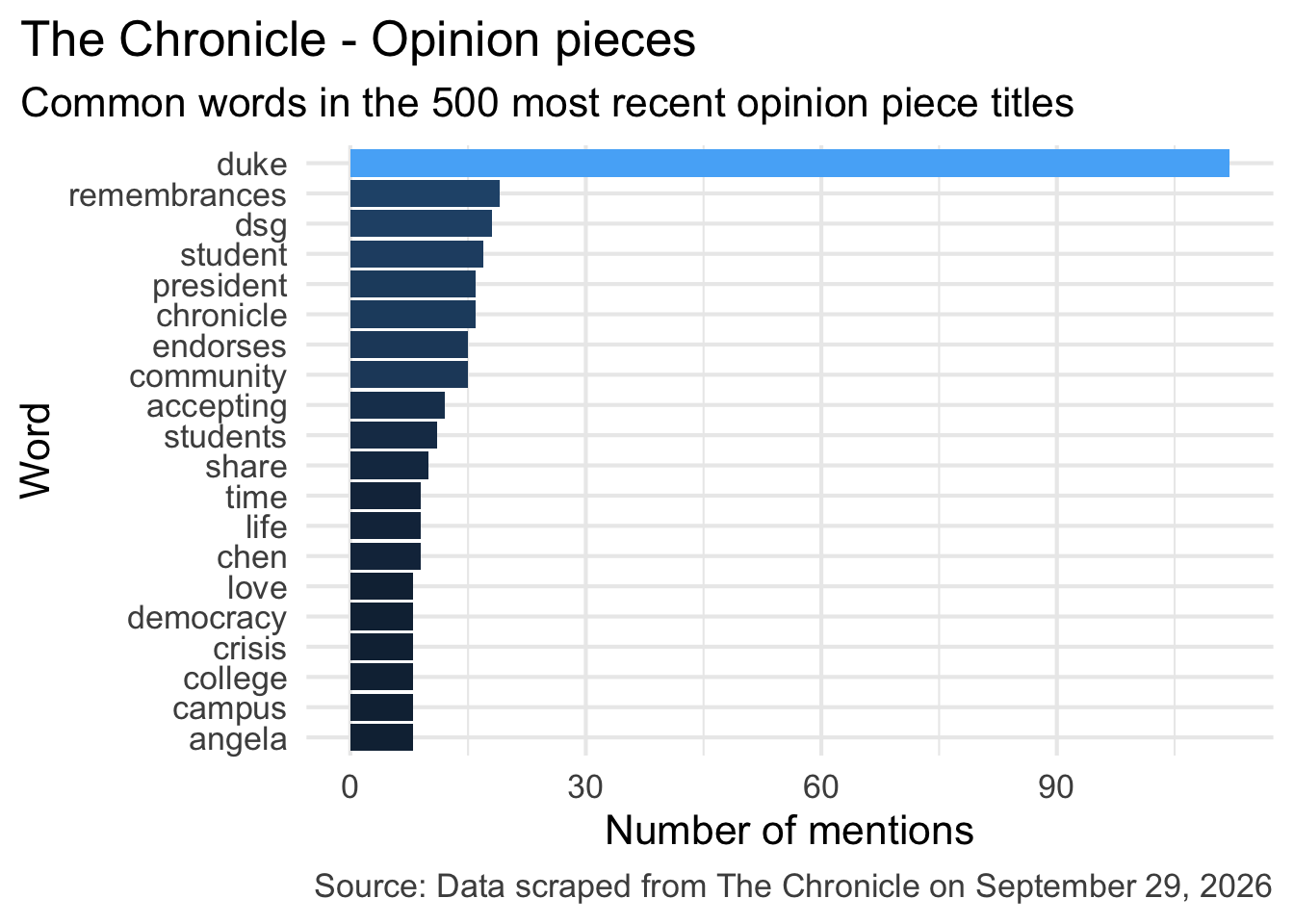
What do you think is the most common word in the titles of The Chronicle opinion pieces?
Common words in The Chronicle titles
Common title words w/o stop words
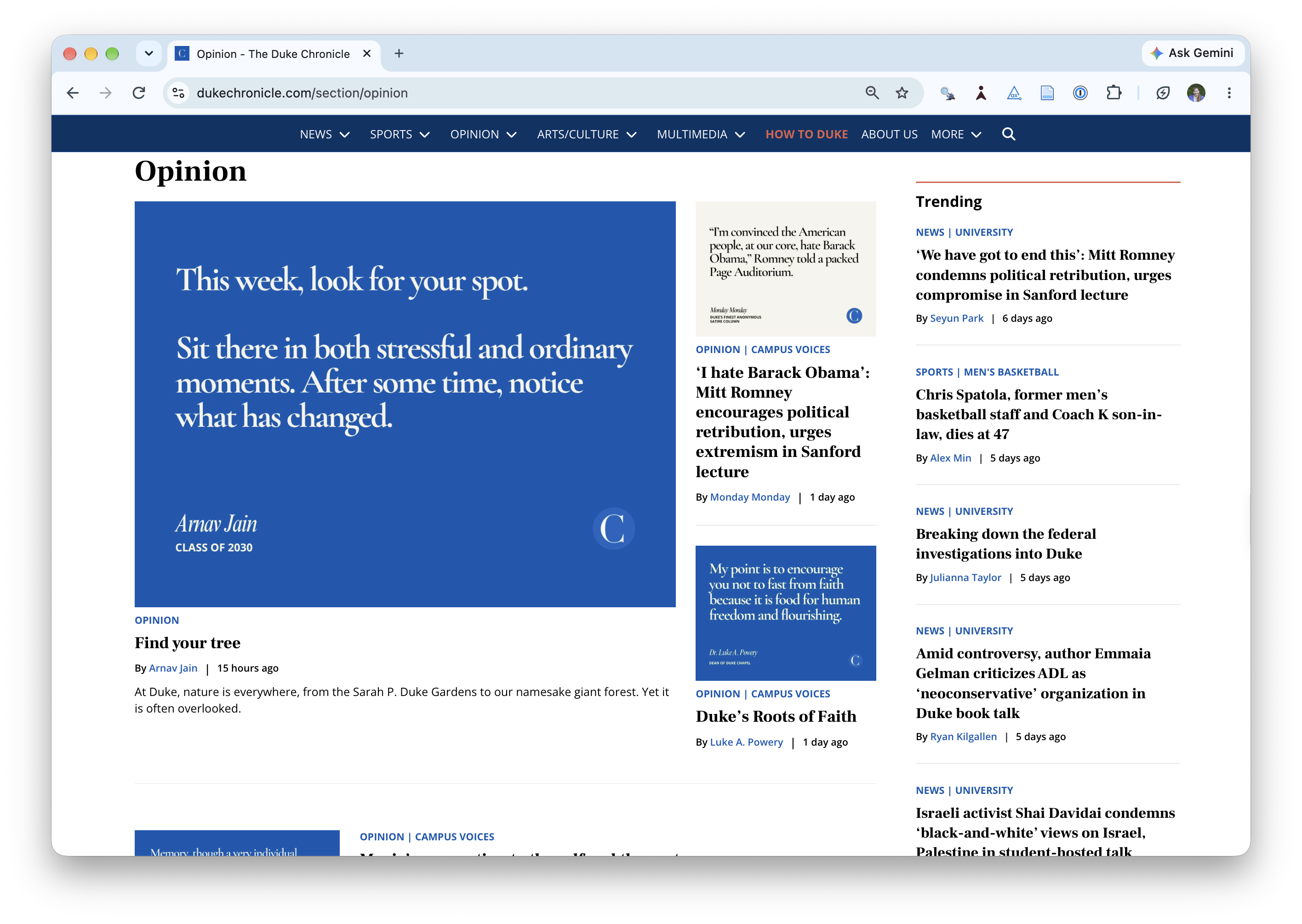
Reading The Chronicle
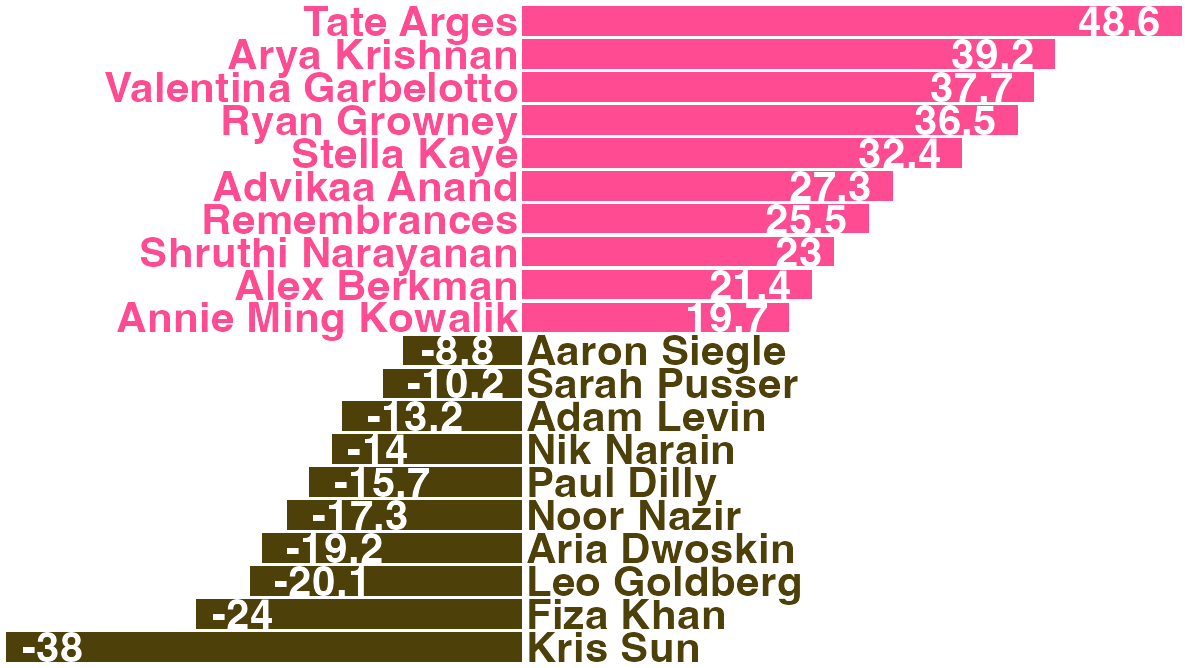
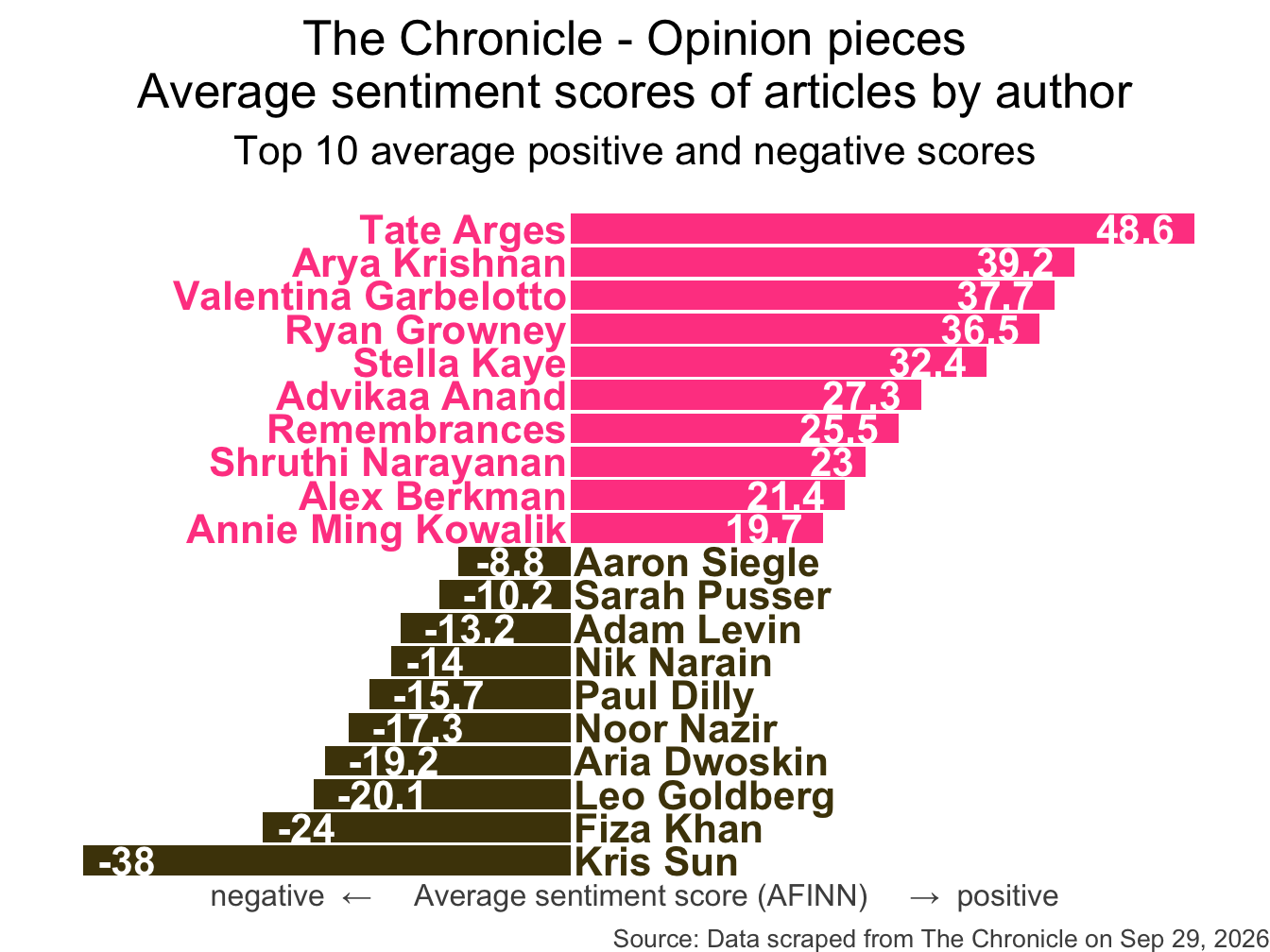
How do you think the sentiments in opinion pieces in The Chronicle compare across authors? Roughly the same? Wildly different? Somewhere in between?
Average sentiment scores
All of this analysis is done in R!
(mostly) with tools you already know!
Common words in The Chronicle titles
Code for the earlier plot:
chronicle |> tidytext::unnest_tokens(word, title, drop =FALSE) |>mutate(word =str_replace_all(word, "’", "'"),word =str_replace(word, "duke's", "duke") ) |>anti_join(stop_words) |>count(word, sort =TRUE) |>slice_head(n =20) |>mutate(word =fct_reorder(word, n)) |>ggplot(aes(y = word, x = n, fill =log(n))) +geom_col(show.legend =FALSE) +theme_minimal(base_size =16) +labs(x ="Number of mentions",y ="Word",title ="The Chronicle - Opinion pieces",subtitle ="Common words in the 500 most recent opinion piece titles",caption ="Source: Data scraped from The Chronicle on September 29, 2026" ) +theme(plot.title.position ="plot",plot.caption =element_text(color ="gray30") )
Avg sentiment scores of articles
Code for the earlier plot:
afinn_sentiments <-read_csv(here::here("slides", "data/afinn-sentiments.csv"))chronicle_author_sentiments <- chronicle |> tidytext::unnest_tokens(word, article_text, drop =FALSE) |>mutate(word =str_replace_all(word, "’", "'")) |>anti_join(stop_words) |>left_join(afinn_sentiments) |>group_by(author, article_text) |>summarize(total_sentiment =sum(value, na.rm =TRUE), .groups ="drop") |>group_by(author) |>summarize(n_articles =n(),avg_sentiment =mean(total_sentiment, na.rm =TRUE), ) |>filter(n_articles >2&!is.na(author)) |>arrange(desc(avg_sentiment)) |>slice(c(1:10, 34:43)) |>mutate(author =fct_reorder(author, avg_sentiment),neg_pos =if_else(avg_sentiment <0, "neg", "pos"),label_position =if_else(neg_pos =="neg", 0.25, -0.25) )ggplot(chronicle_author_sentiments, aes(y = author, x = avg_sentiment)) +geom_col(aes(fill = neg_pos), show.legend =FALSE) +geom_text(aes(x = label_position, label = author, color = neg_pos),hjust =c(rep(1, 10), rep(0, 10)),show.legend =FALSE,fontface ="bold" ) +geom_text(aes(label =round(avg_sentiment, 1)),hjust =c(rep(1.25, 10), rep(-0.25, 10)),color ="white",fontface ="bold" ) +scale_fill_manual(values =c("neg"="#4d4009", "pos"="#FF4B91")) +scale_color_manual(values =c("neg"="#4d4009", "pos"="#FF4B91")) +coord_cartesian(xlim =c(-40, 50)) +labs(x ="negative ← Average sentiment score (AFINN) → positive",y =NULL,title ="The Chronicle - Opinion pieces\nAverage sentiment scores of articles by author",subtitle ="Top 10 average positive and negative scores",caption ="Source: Data scraped from The Chronicle on Sep 29, 2026" ) +theme_void(base_size =16) +theme(plot.title =element_text(hjust =0.5),plot.subtitle =element_text(hjust =0.5,margin =margin(t =0.5, r =0, b =1, l =0, unit ="lines") ),axis.title.x =element_text(color ="gray30", size =12),plot.caption =element_text(color ="gray30", size =10) )
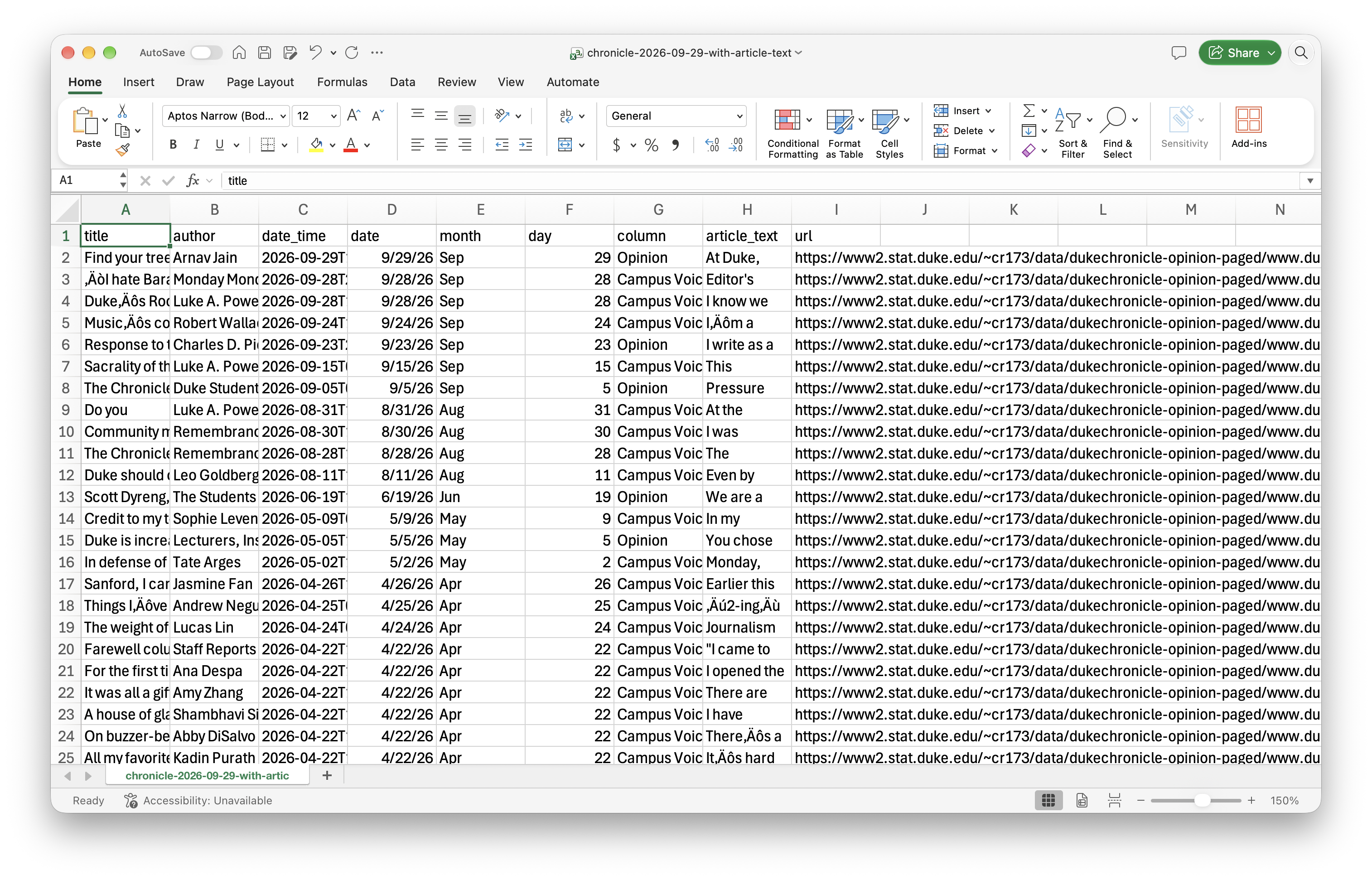
# A tibble: 500 × 9
title author date_time date month day column article_text
<chr> <chr> <dttm> <date> <chr> <dbl> <chr> <chr>
1 Find y… Arnav… 2026-09-29 12:00:00 2026-09-29 Sep 29 Opini… "At Duke, n…
2 ‘I hat… Monda… 2026-09-28 21:42:00 2026-09-28 Sep 28 Campu… "Editor's n…
3 Duke’s… Luke … 2026-09-28 14:36:00 2026-09-28 Sep 28 Campu… "I know we …
4 Music’… Rober… 2026-09-24 10:00:00 2026-09-24 Sep 24 Campu… "I’m a nost…
5 Respon… Charl… 2026-09-23 20:27:00 2026-09-23 Sep 23 Opini… "I write as…
6 Sacral… Luke … 2026-09-15 02:19:00 2026-09-15 Sep 15 Campu… "This semes…
7 The Ch… Duke … 2026-09-05 00:37:00 2026-09-05 Sep 5 Opini… "Pressure c…
8 Do you Luke … 2026-08-31 13:57:00 2026-08-31 Aug 31 Campu… "At the beg…
9 Commun… Remem… 2026-08-30 16:29:00 2026-08-30 Aug 30 Campu… "I was coll…
10 The Ch… Remem… 2026-08-28 12:00:00 2026-08-28 Aug 28 Campu… "The Chroni…
# ℹ 490 more rows
# ℹ 1 more variable: url <chr>
Web scraping
Scraping the web: what? why?
Increasing amount of data is available on the web
These data are provided in an unstructured format: you can always copy&paste, but it’s time-consuming and prone to errors
Web scraping is the process of extracting this information automatically and transform it into a structured dataset
Two different scenarios:
Screen scraping: extract data from source code of website, with html parser (easy) or regular expression matching (less easy).
Web APIs (application programming interface): website offers a set of structured http requests that return JSON or XML files.
Hypertext Markup Language
Most of the data on the web is still largely available as HTML - while it is structured (hierarchical) it often is not available in a form useful for analysis (flat / tidy).
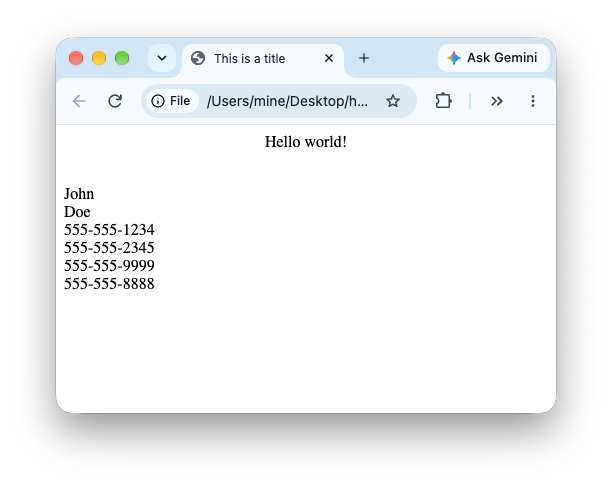
<html><head><title>This is a title</title></head><body><p align="center">Hello world!</p><br/><div class="name" id="first">John</div><div class="name" id="last">Doe</div><div class="contact"><div class="home">555-555-1234</div><div class="home">555-555-2345</div><div class="work">555-555-9999</div><div class="fax">555-555-8888</div></div></body></html>
rvest
The rvest package makes basic processing and manipulation of HTML data straight forward
It’s designed to work with pipelines built with |>
source_code_for_a_boring_page <-read_html("<p> This is the first sentence in the paragraph. This is the second sentence that should be on the same line as the first sentence.<br>This third sentence should start on a new line. </p>")
html_text():
source_code_for_a_boring_page |>html_text()
[1] " \n This is the first sentence in the paragraph.\n This is the second sentence that should be on the same line as the first sentence.This third sentence should start on a new line.\n "
html_text2():
source_code_for_a_boring_page |>html_text2()
[1] "This is the first sentence in the paragraph. This is the second sentence that should be on the same line as the first sentence.\nThis third sentence should start on a new line."
Finding the elements to select
Some examples of basic selector syntax is below:
Selector
Example
Description
.class
.title
Select all elements with class=“title”
#id
#name
Select all elements with id=“name”
element
p
Select all <p> elements
element element
div p
Select all <p> elements inside a <div> element
element>element
div > p
Select all <p> elements with <div> as a parent
[attribute]
[class]
Select all elements with a class attribute
[attribute=value]
[class=title]
Select all elements with class=“title”
Though, thankfully you don’t need to worry about these details as the SelectorGadget will just tell you what to grab!
SelectorGadget
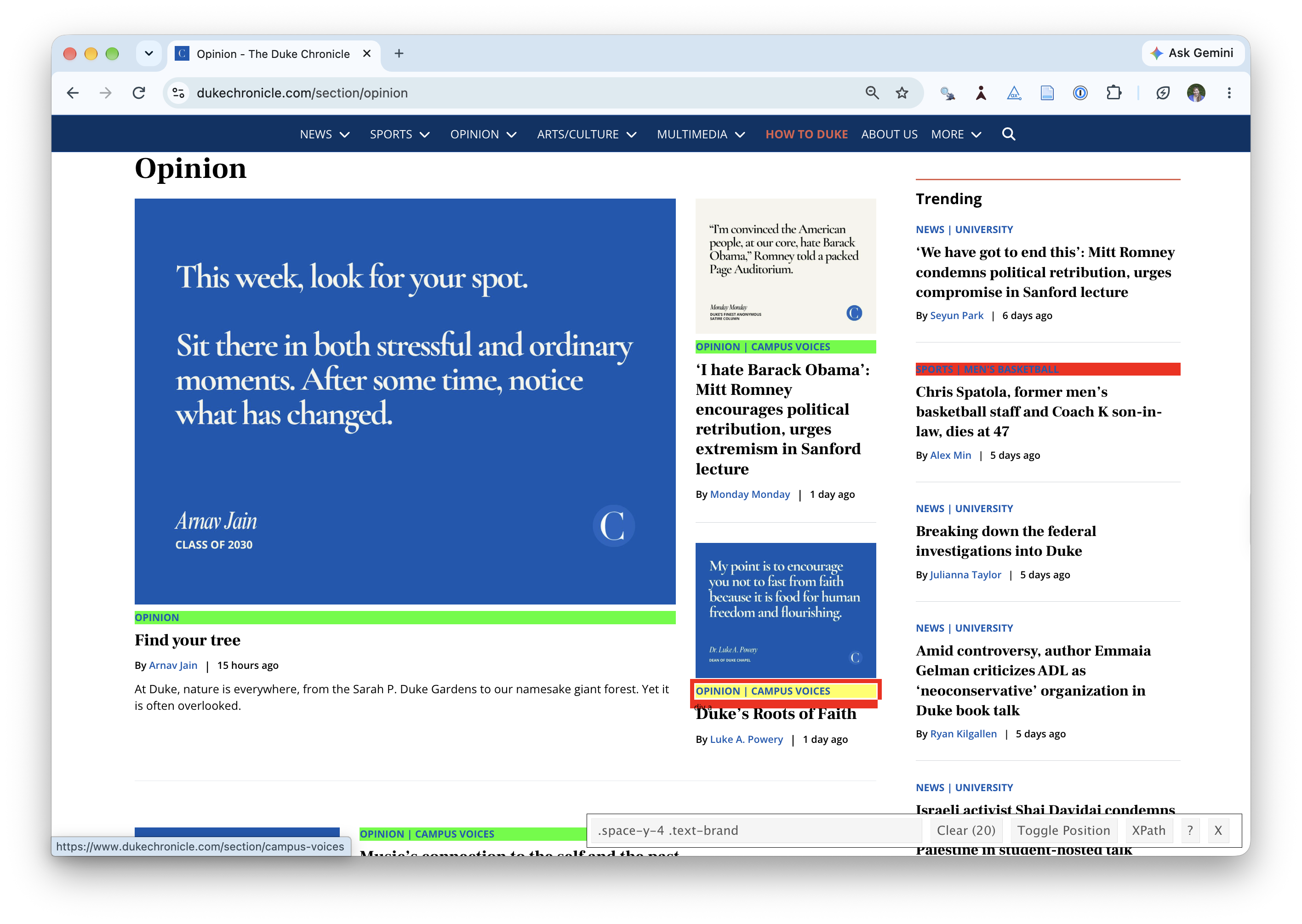
SelectorGadget (selectorgadget.com) is a javascript based tool that helps you interactively build an appropriate CSS selector for the content you are interested in.
If you haven’t yet done so, make sure all of your changes up to this point are committed and pushed, i.e., there’s nothing left in your source control pane.
If you haven’t yet done so, pull to get today’s application exercise file: ae-07-chronicle-scrape-I.qmd.
Work through the application exercise in class, and render, commit, and push your edits by the end of class.