Importing and recoding data
Lecture 9
Warm-up
While you wait: Participate 📱💻
Did you get my Week 5 nudge email?
- Yes, I did! And I don’t have any questions.
- Yes, I did! And I have questions.
- I haven’t checked my email today yet, I will do so after class.
- What, you email us?!

Go to wooclap.com and use the code IQYBPOT.
Announcements
HW 4 due Wednesday – last homework before the exam
Exam 1 covers everything up to and including the material in next Monday’s lecture, but Monday’s lecture is catch-up + review (so effectively up to and including the material in this Wednesday’s lecture)
From last time
ae-05-survey-types
Go to your ae project in Positron.
Continue working in last week’s application exercise file:
ae-05-survey-types.qmd.Work through the application exercise in class, and render, commit, and push your edits by the end of class.
Reading data into R
Reading rectangular data
- Using readr:
- Most commonly:
read_csv() - Maybe also:
read_tsv(),read_delim(), etc.
- Most commonly:
. . .
- Using readxl:
read_excel()
. . .
- Using googlesheets4:
read_sheet()– We haven’t covered this in the videos, but might be useful for your projects
Close look at read_csv()
Close look at read_csv() - file
- Specifies where to read the CSV data from.
- Use a quoted file path, e.g.,
file = "data/survey.csv", or a URL. - Relative paths start from your working directory.
- Required: no default value.
Close look at read_csv() - na
Close look at read_csv() - quote
Close look at read_csv() - skip
To skip or not to skip?
For example, temperatures.csv has a metadata block before the table:
Weather station: Durham, NC
Temperature units: Celsius
date,temperature
2026-09-21,24
2026-09-22,22
To skip or not to skip?
read_csv("data/durham-temps.csv")Warning: One or more parsing issues, call `problems()` on your data frame for details,
e.g.:
dat <- vroom(...)
problems(dat)Rows: 4 Columns: 2
── Column specification ────────────────────────────────────────────────────────
Delimiter: ","
chr (2): Weather station: Durham, NC
ℹ Use `spec()` to retrieve the full column specification for this data.
ℹ Specify the column types or set `show_col_types = FALSE` to quiet this message.# A tibble: 4 × 2
`Weather station: Durham` NC
<chr> <chr>
1 Temperature units: Celsius <NA>
2 date temperature
3 2026-09-21 24
4 2026-09-22 22 To skip or not to skip?
read_csv("data/durham-temps.csv", skip = 2)Rows: 2 Columns: 2
── Column specification ────────────────────────────────────────────────────────
Delimiter: ","
dbl (1): temperature
date (1): date
ℹ Use `spec()` to retrieve the full column specification for this data.
ℹ Specify the column types or set `show_col_types = FALSE` to quiet this message.# A tibble: 2 × 2
date temperature
<date> <dbl>
1 2026-09-21 24
2 2026-09-22 22Close look at read_csv() - n_max
Close look at read_csv() - guess_max
Close look at read_csv() - name_repair
- Controls how column names are repaired.
- Default:
"unique"fixes empty or duplicated names. - Example: two columns named
agebecomeage...1andage...2. -
"universal"also makes names valid without backticks.
Application exercise
Reading Excel files
Read an Excel file, with all its Excel-ness
Split it into subsets based on features of the data
Write out subsets as CSV files
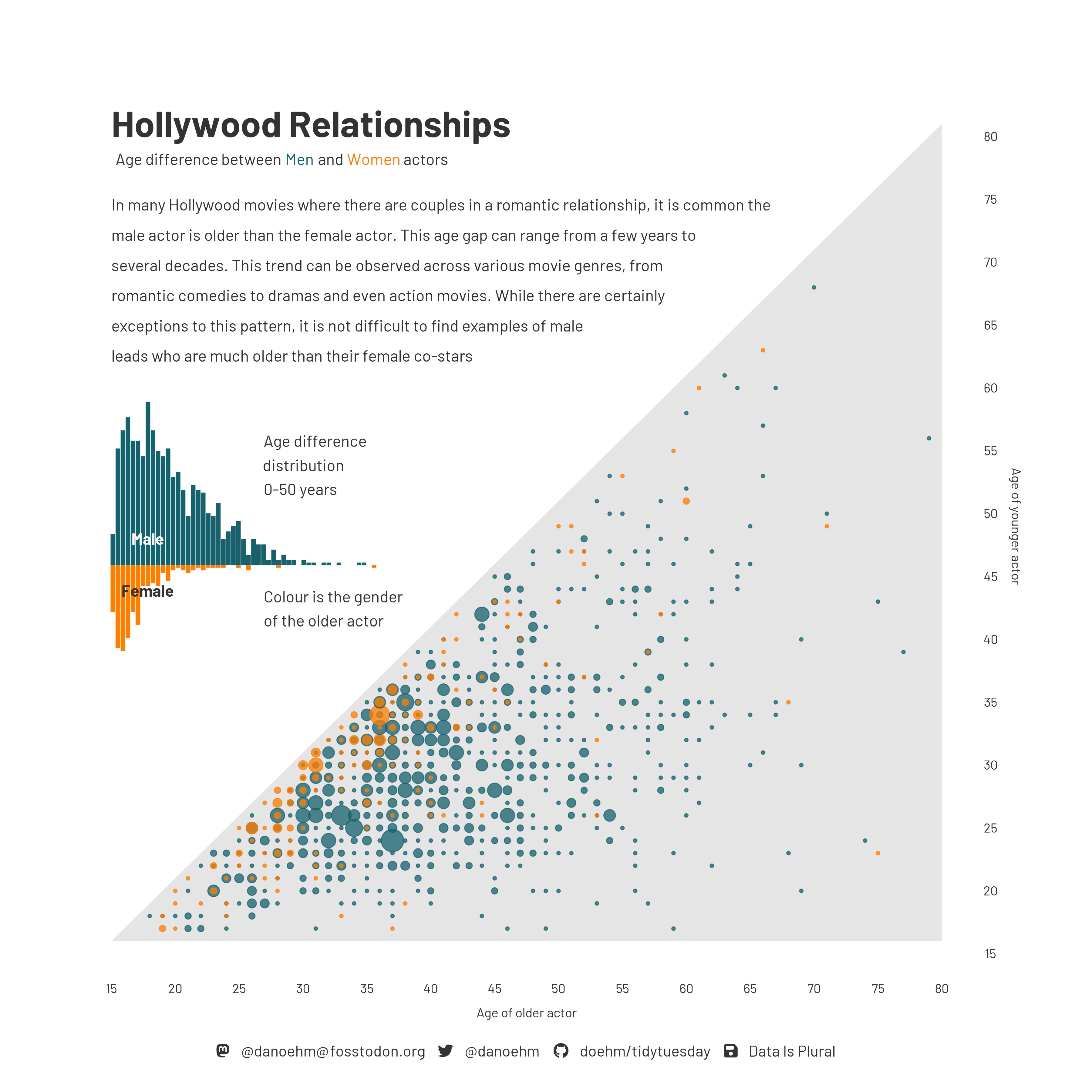
Age gap in Hollywood relationships
Identify and articulate one feature of the data based on this visualization.
ae-06-age-gaps-import
Go to your ae project in Positron.
If you haven’t yet done so, make sure all of your changes up to this point are committed and pushed, i.e., there’s nothing left in your source control pane.
If you haven’t yet done so, pull to get today’s application exercise file:
ae-06-age-gaps-import.qmd.Work through the application exercise in class, and render, commit, and push your edits by the end of class.