Web scraping
a single page
Lecture 11
Warm-up
While you wait: Participate 📱💻
Guess: What is this plot about?
Then, make sure you have a Chrome browser and the SelectorGadget extension installed.

Go to wooclap.com and use the code XSNFYKS.
Announcements
HW 4 due tonight at 11:59 pm
-
Exam 1 is next Wednesday:
- Covers all material up to and including today’s lecture
- Sample exam posted (and open-ended questions will be added later this evening)
- Exam will be in class, closed book, no calculators, no computers, just 1 notes sheet
- Notes sheet: 8.5x11, both sides, hand written or typed, any content you want, must be prepared by you
Project
https://sta199-f26.github.io/project/description.html
- Tomorrow in lab: Milestone 1
- Start working in project teams, practice technical aspects of collaboration on data science projects
- Write your team contract
- Identify common interests
- Next week’s lab: Milestone 2 (proposal)
- Start thinking about your project idea and potential data sources now so you can easily finish Milestone 2 in lab, before fall break
From last time
Quick review of ae-06-age-gaps-import.
Data on the web
Participate 📱💻
How often do you read The Chronicle?
- Every day
- 3-5 times a week
- Once a week
- Rarely
Go to wooclap.com and use the code XSNFYKS.
Reading The Chronicle
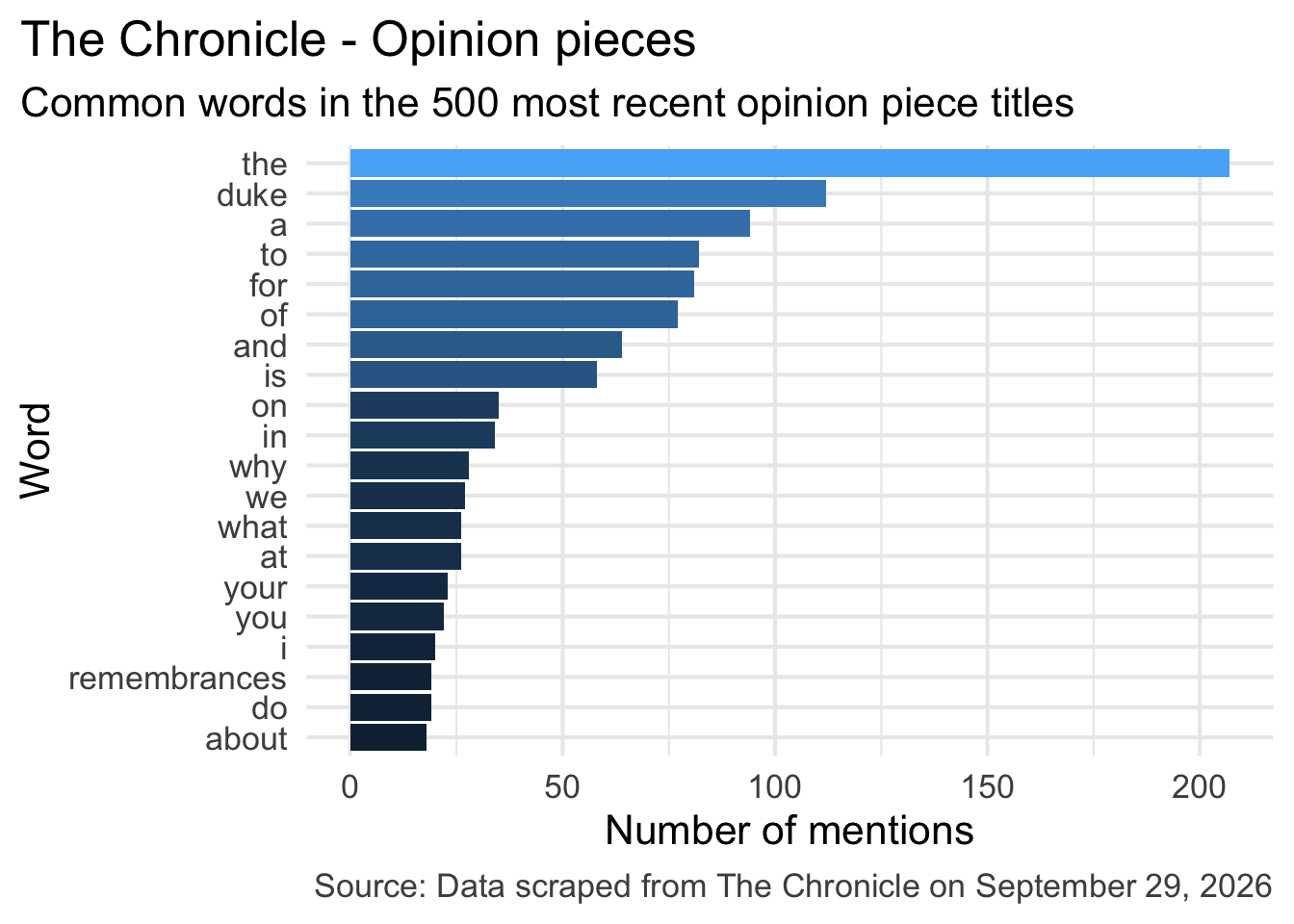
What do you think is the most common word in the titles of The Chronicle opinion pieces?
Common words in The Chronicle titles
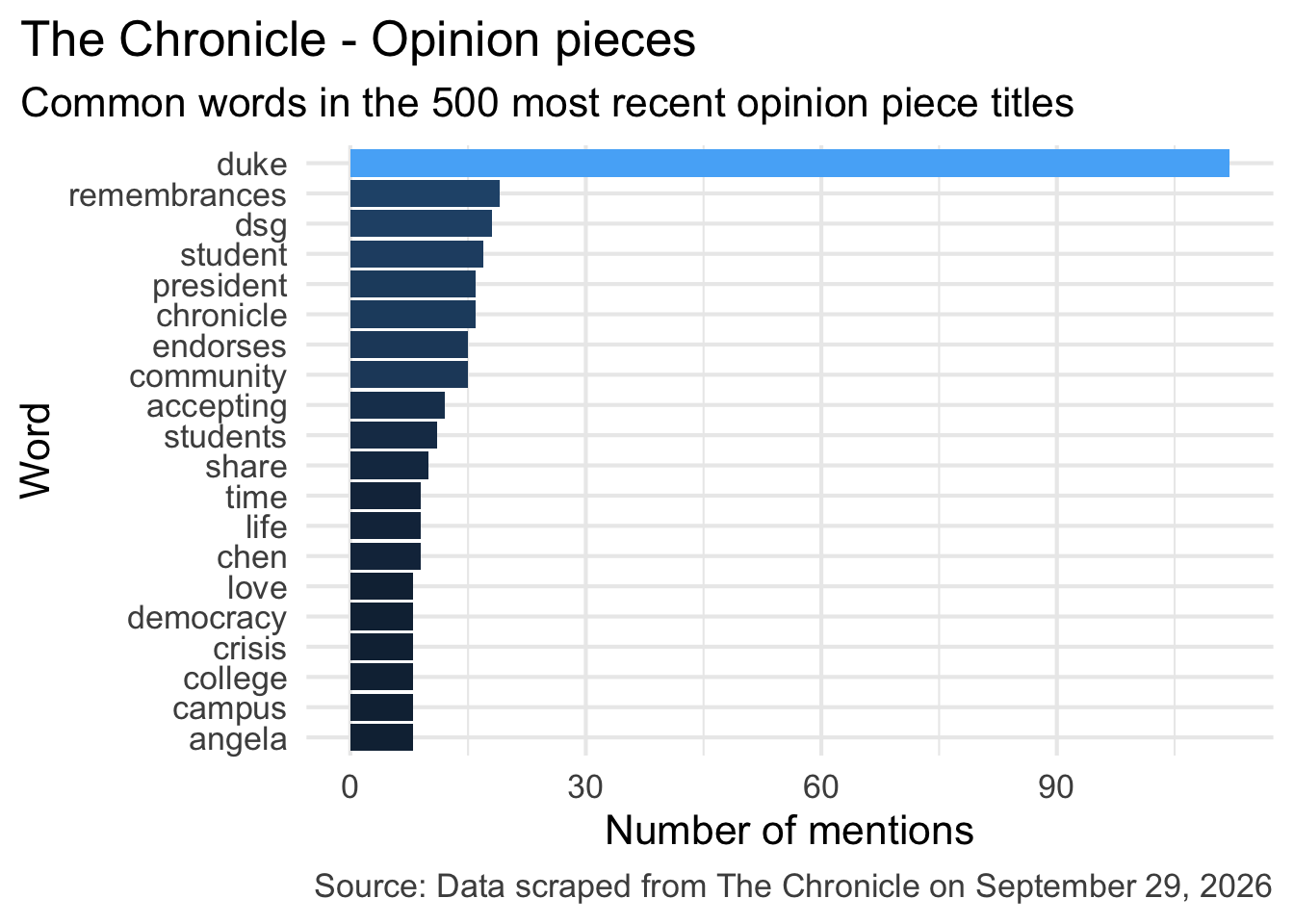
Common title words w/o stop words
Reading The Chronicle
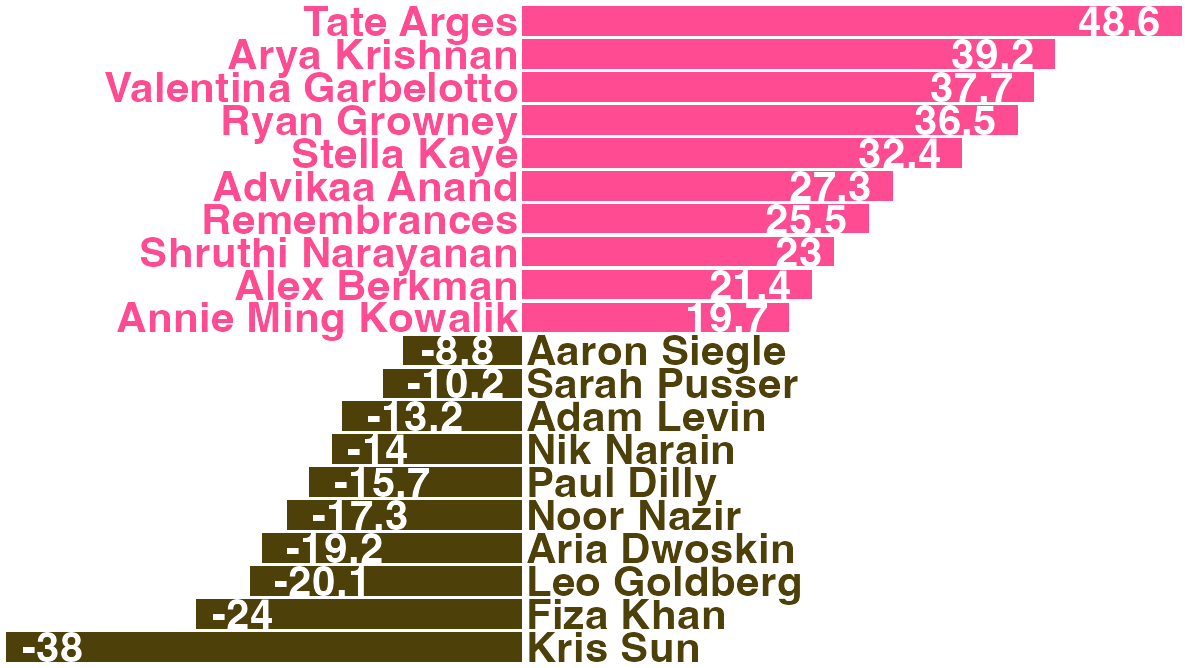
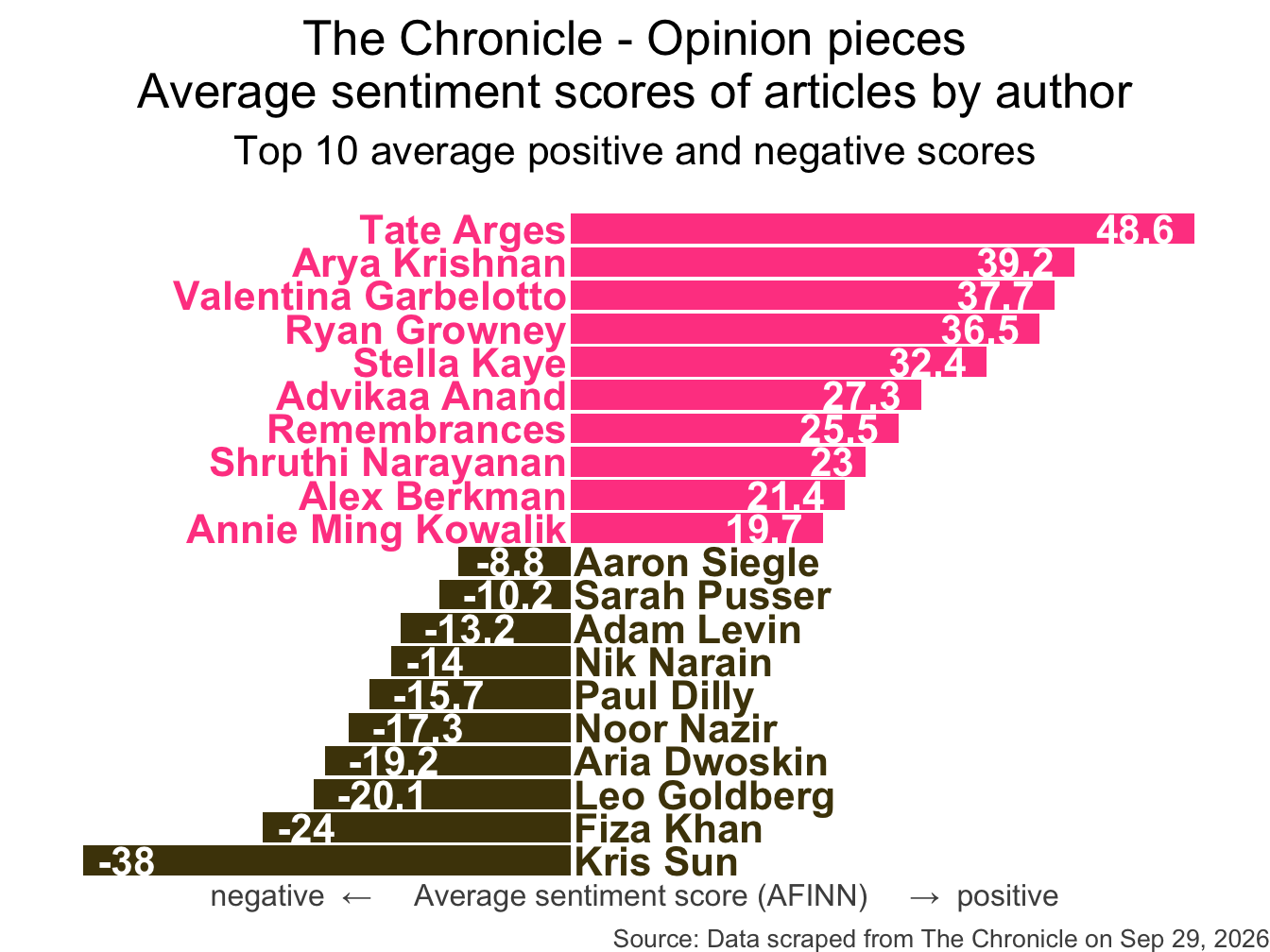
How do you think the sentiments in opinion pieces in The Chronicle compare across authors? Roughly the same? Wildly different? Somewhere in between?
Average sentiment scores
All of this analysis is done in R!
(mostly) with tools you already know!
Common words in The Chronicle titles
Code for the earlier plot:
chronicle |>
  tidytext::unnest_tokens(word, title, drop = FALSE) |>
  mutate(
    word = str_replace_all(word, "’", "'"),
    word = str_replace(word, "duke's", "duke")
  ) |>
  anti_join(stop_words) |>
  count(word, sort = TRUE) |>
  slice_head(n = 20) |>
  mutate(word = fct_reorder(word, n)) |>
  ggplot(aes(y = word, x = n, fill = log(n))) +
  geom_col(show.legend = FALSE) +
  theme_minimal(base_size = 16) +
  labs(
    x = "Number of mentions",
    y = "Word",
    title = "The Chronicle - Opinion pieces",
    subtitle = "Common words in the 500 most recent opinion piece titles",
    caption = "Source: Data scraped from The Chronicle on September 29, 2026"
  ) +
  theme(
    plot.title.position = "plot",
    plot.caption = element_text(color = "gray30")
  )
Avg sentiment scores of articles
Code for the earlier plot:
afinn_sentiments <- read_csv(here::here("slides", "data/afinn-sentiments.csv"))
chronicle_author_sentiments <- chronicle |>
  tidytext::unnest_tokens(word, article_text, drop = FALSE) |>
  mutate(word = str_replace_all(word, "’", "'")) |>
  anti_join(stop_words) |>
  left_join(afinn_sentiments) |>
  group_by(author, article_text) |>
  summarize(total_sentiment = sum(value, na.rm = TRUE), .groups = "drop") |>
  group_by(author) |>
  summarize(
    n_articles = n(),
    avg_sentiment = mean(total_sentiment, na.rm = TRUE),
  ) |>
  filter(n_articles > 2 & !is.na(author)) |>
  arrange(desc(avg_sentiment)) |>
  slice(c(1:10, 34:43)) |>
  mutate(
    author = fct_reorder(author, avg_sentiment),
    neg_pos = if_else(avg_sentiment < 0, "neg", "pos"),
    label_position = if_else(neg_pos == "neg", 0.25, -0.25)
  )

ggplot(chronicle_author_sentiments, aes(y = author, x = avg_sentiment)) +
  geom_col(aes(fill = neg_pos), show.legend = FALSE) +
  geom_text(
    aes(x = label_position, label = author, color = neg_pos),
    hjust = c(rep(1, 10), rep(0, 10)),
    show.legend = FALSE,
    fontface = "bold"
  ) +
  geom_text(
    aes(label = round(avg_sentiment, 1)),
    hjust = c(rep(1.25, 10), rep(-0.25, 10)),
    color = "white",
    fontface = "bold"
  ) +
  scale_fill_manual(values = c("neg" = "#4d4009", "pos" = "#FF4B91")) +
  scale_color_manual(values = c("neg" = "#4d4009", "pos" = "#FF4B91")) +
  coord_cartesian(xlim = c(-40, 50)) +
  labs(
    x = "negative  ←     Average sentiment score (AFINN)     →  positive",
    y = NULL,
    title = "The Chronicle - Opinion pieces\nAverage sentiment scores of articles by author",
    subtitle = "Top 10 average positive and negative scores",
    caption = "Source: Data scraped from The Chronicle on Sep 29, 2026"
  ) +
  theme_void(base_size = 16) +
  theme(
    plot.title = element_text(hjust = 0.5),
    plot.subtitle = element_text(
      hjust = 0.5,
      margin = margin(t = 0.5, r = 0, b = 1, l = 0, unit = "lines")
    ),
    axis.title.x = element_text(color = "gray30", size = 12),
    plot.caption = element_text(color = "gray30", size = 10)
  )
Where is the data coming from?
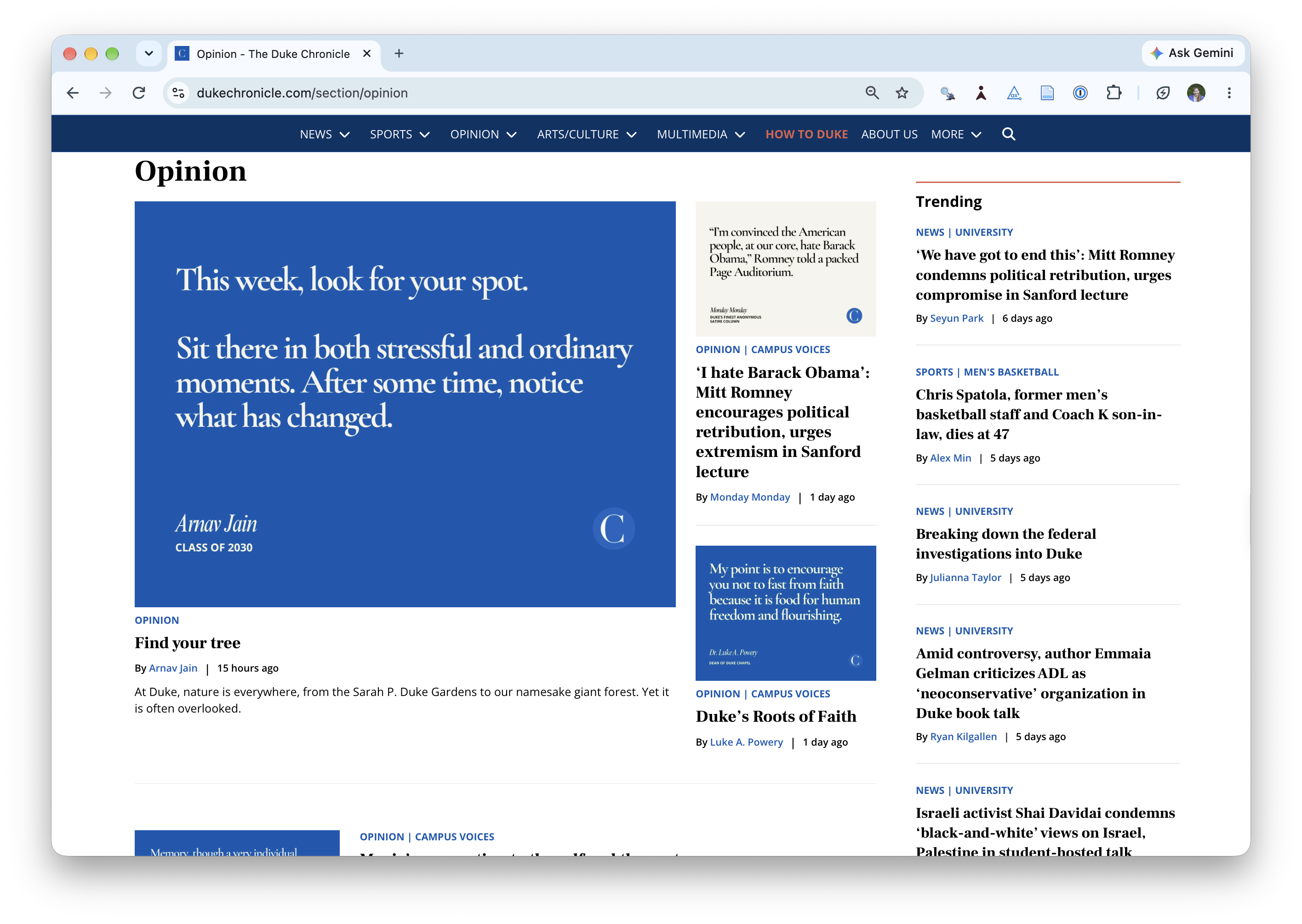
Where is the data coming from?
chronicle# A tibble: 500 × 9
title author date_time date month day column article_text
<chr> <chr> <dttm> <date> <chr> <dbl> <chr> <chr>
1 Find y… Arnav… 2026-09-29 12:00:00 2026-09-29 Sep 29 Opini… "At Duke, n…
2 ‘I hat… Monda… 2026-09-28 21:42:00 2026-09-28 Sep 28 Campu… "Editor's n…
3 Duke’s… Luke … 2026-09-28 14:36:00 2026-09-28 Sep 28 Campu… "I know we …
4 Music’… Rober… 2026-09-24 10:00:00 2026-09-24 Sep 24 Campu… "I’m a nost…
5 Respon… Charl… 2026-09-23 20:27:00 2026-09-23 Sep 23 Opini… "I write as…
6 Sacral… Luke … 2026-09-15 02:19:00 2026-09-15 Sep 15 Campu… "This semes…
7 The Ch… Duke … 2026-09-05 00:37:00 2026-09-05 Sep 5 Opini… "Pressure c…
8 Do you Luke … 2026-08-31 13:57:00 2026-08-31 Aug 31 Campu… "At the beg…
9 Commun… Remem… 2026-08-30 16:29:00 2026-08-30 Aug 30 Campu… "I was coll…
10 The Ch… Remem… 2026-08-28 12:00:00 2026-08-28 Aug 28 Campu… "The Chroni…
# ℹ 490 more rows
# ℹ 1 more variable: url <chr>Web scraping
Scraping the web: what? why?
Increasing amount of data is available on the web
These data are provided in an unstructured format: you can always copy&paste, but it’s time-consuming and prone to errors
Web scraping is the process of extracting this information automatically and transform it into a structured dataset
-
Two different scenarios:
Screen scraping: extract data from source code of website, with html parser (easy) or regular expression matching (less easy).
Web APIs (application programming interface): website offers a set of structured http requests that return JSON or XML files.
Hypertext Markup Language
Most of the data on the web is still largely available as HTML - while it is structured (hierarchical) it often is not available in a form useful for analysis (flat / tidy).
<html>
  <head>
    <title>This is a title</title>
  </head>
  <body>
    <p align="center">Hello world!</p>
    <br/>
    <div class="name" id="first">John</div>
    <div class="name" id="last">Doe</div>
    <div class="contact">
      <div class="home">555-555-1234</div>
      <div class="home">555-555-2345</div>
      <div class="work">555-555-9999</div>
      <div class="fax">555-555-8888</div>
    </div>
  </body>
</html>
rvest
- The rvest package makes basic processing and manipulation of HTML data straight forward
- It’s designed to work with pipelines built with
|> - rvest.tidyverse.org

rvest
Core functions:
read_html()- read HTML data from a url or character string.html_elements()- select specified elements from the HTML document using CSS selectors (or xpath).html_element()- select a single element from the HTML document using CSS selectors (or xpath).html_table()- parse an HTML table into a data frame.html_text()/html_text2()- extract tag’s text content.html_name- extract a tag/element’s name(s).html_attrs- extract all attributes.html_attr- extract attribute value(s) by name.
A web page’s source code is HTML
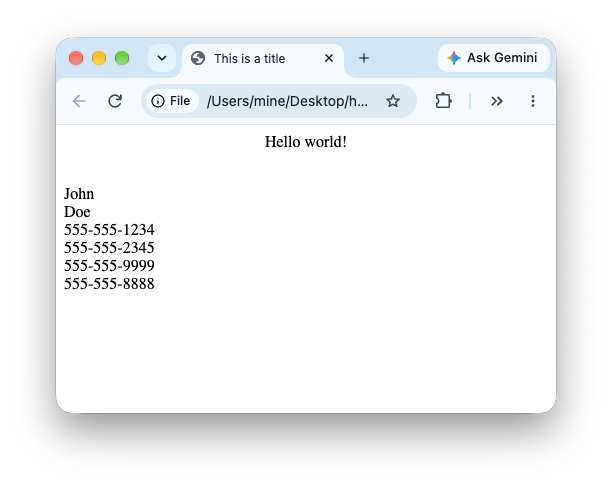
source_code_for_a_page <-
  '<html>
  <head>
    <title>This is a title</title>
  </head>
  <body>
    <p align="center">Hello world!</p>
    <br/>
    <div class="name" id="first">John</div>
    <div class="name" id="last">Doe</div>
    <div class="contact">
      <div class="home">555-555-1234</div>
      <div class="home">555-555-2345</div>
      <div class="work">555-555-9999</div>
      <div class="fax">555-555-8888</div>
    </div>
  </body>
</html>'
page <- read_html(source_code_for_a_page)
page{html_document}
<html>
[1] <head>\n<meta http-equiv="Content-Type" content="text/html; charset=UTF-8 ...
[2] <body>\n <p align="center">Hello world!</p>\n <br><div class="name" ...Selecting elements from HTML
Give me all the elements tagged p:
page |> html_elements("p"){xml_nodeset (1)}
[1] <p align="center">Hello world!</p>Give me the human-readable text of all the elements tagged p:
page |> html_elements("p") |> html_text()[1] "Hello world!"Give me the attributes of all the elements tagged p:
page |> html_elements("p") |> html_attrs()[[1]]
align
"center" Give me the value of the align attribute of all the elements tagged p:
page |> html_elements("p") |> html_attr("align")[1] "center"Selecting elements from HTML
Give me all the elements tagged div:
page |> html_elements("div"){xml_nodeset (7)}
[1] <div class="name" id="first">John</div>
[2] <div class="name" id="last">Doe</div>
[3] <div class="contact">\n <div class="home">555-555-1234</div>\n ...
[4] <div class="home">555-555-1234</div>
[5] <div class="home">555-555-2345</div>
[6] <div class="work">555-555-9999</div>
[7] <div class="fax">555-555-8888</div>. . .
- Give me the human-readable text of all the elements tagged
div:
page |> html_elements("div") |> html_text()[1] "John"
[2] "Doe"
[3] "\n 555-555-1234\n 555-555-2345\n 555-555-9999\n 555-555-8888\n "
[4] "555-555-1234"
[5] "555-555-2345"
[6] "555-555-9999"
[7] "555-555-8888" Extracting text from selected elements
source_code_for_a_boring_page <- read_html(
  "<p>
    This is the first sentence in the paragraph.
    This is the second sentence that should be on the same line as the first sentence.<br>This third sentence should start on a new line.
  </p>"
)source_code_for_a_boring_page |>
html_text()[1] " \n This is the first sentence in the paragraph.\n This is the second sentence that should be on the same line as the first sentence.This third sentence should start on a new line.\n "source_code_for_a_boring_page |>
html_text2()[1] "This is the first sentence in the paragraph. This is the second sentence that should be on the same line as the first sentence.\nThis third sentence should start on a new line."Finding the elements to select
- Some examples of basic selector syntax is below:
| Selector | Example | Description |
|---|---|---|
| .class | .title |
Select all elements with class=“title” |
| #id | #name |
Select all elements with id=“name” |
| element | p |
Select all <p> elements |
| element element | div p |
Select all <p> elements inside a <div> element |
| element>element | div > p |
Select all <p> elements with <div> as a parent |
| [attribute] | [class] |
Select all elements with a class attribute |
| [attribute=value] | [class=title] |
Select all elements with class=“title” |
- Though, thankfully you don’t need to worry about these details as the SelectorGadget will just tell you what to grab!
SelectorGadget
SelectorGadget (selectorgadget.com) is a javascript based tool that helps you interactively build an appropriate CSS selector for the content you are interested in.
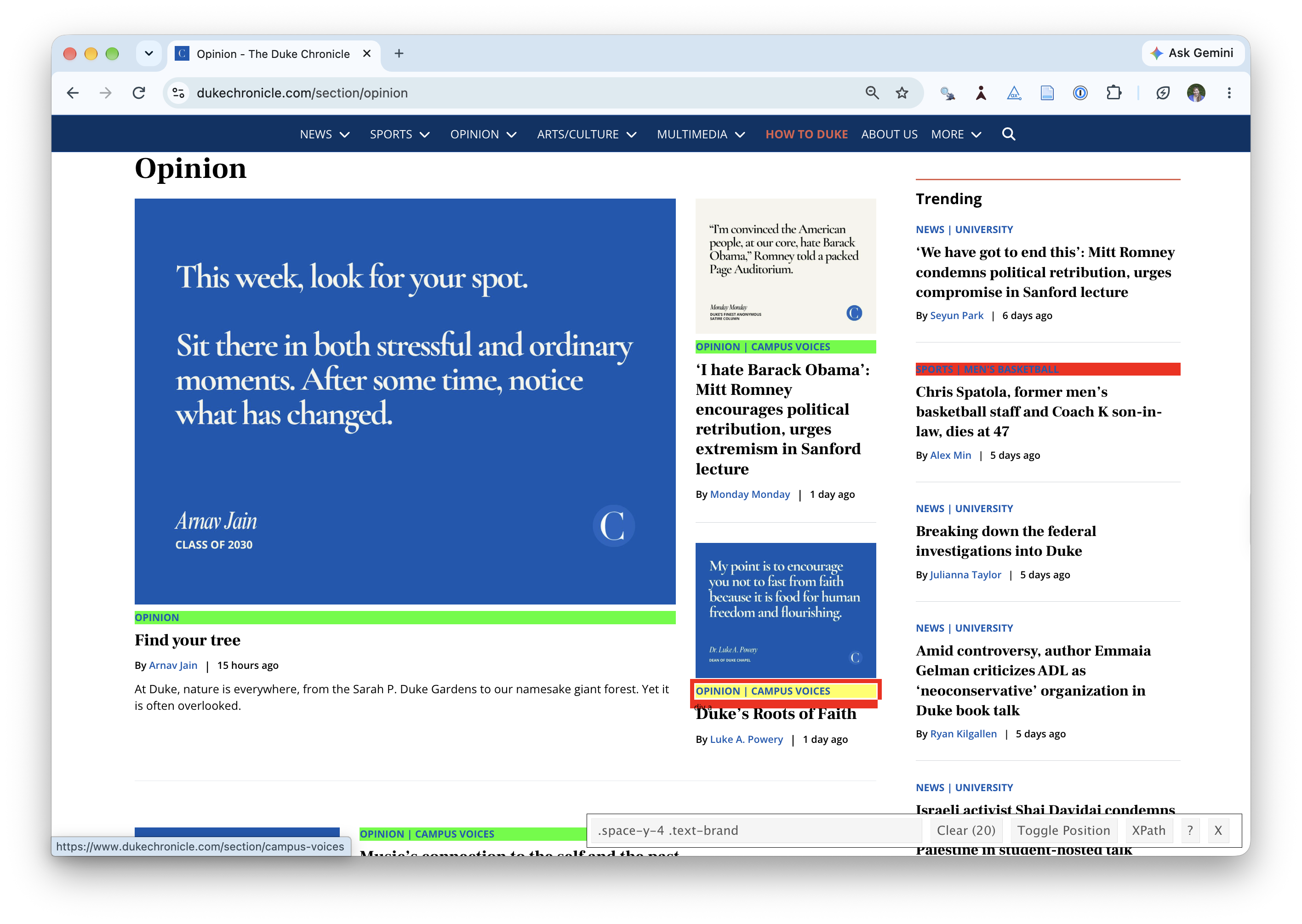
Application exercise
Opinion articles in The Chronicle
Go to a cached copy of The Chronicle’s opinion page as of last night.
How many articles are on the page?
Goal
- Scrape data and organize it in a tidy format in R
- Perform light text parsing to clean data
- Summarize and visualze the data
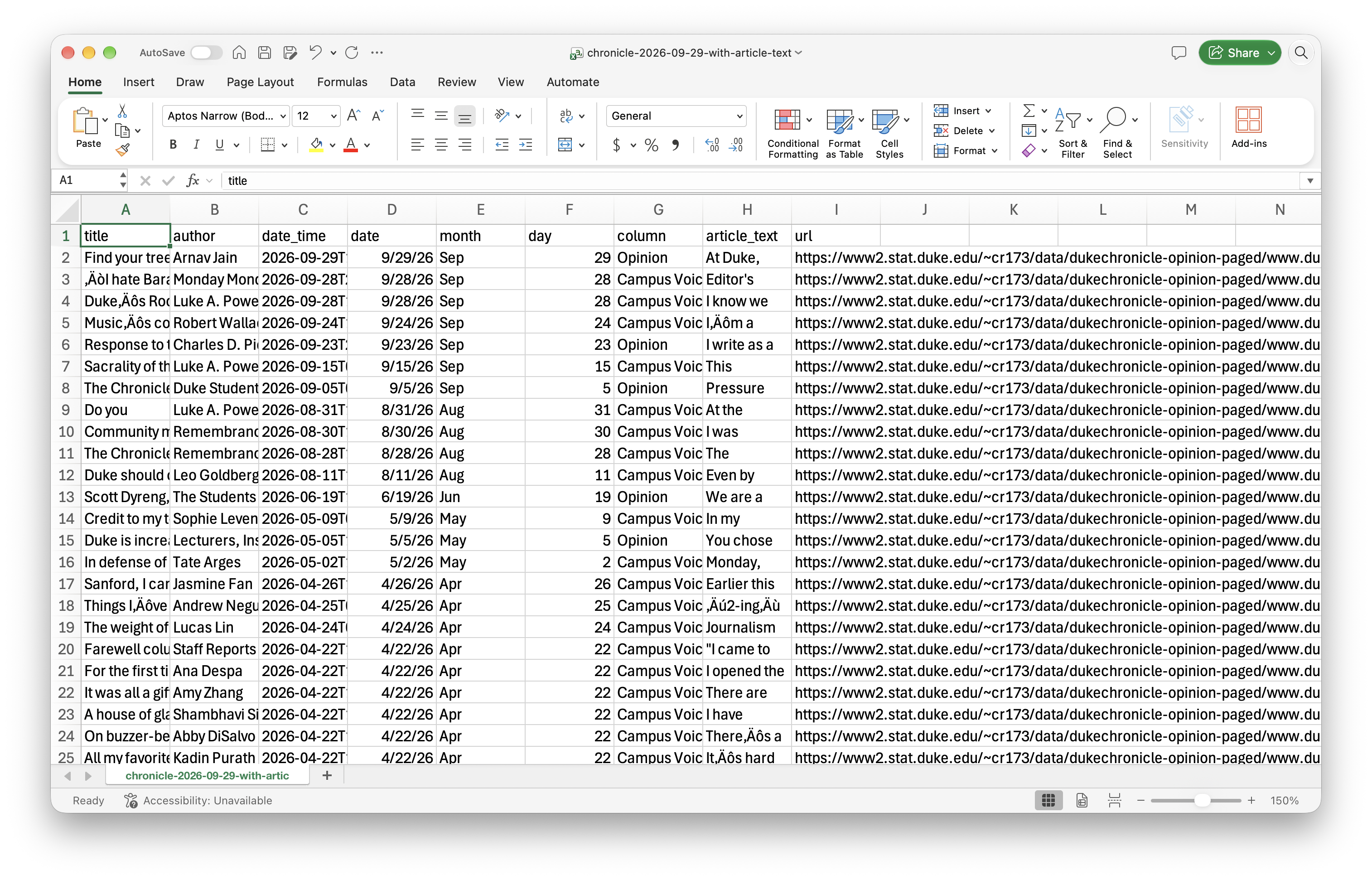
ae-07-chronicle-scrape-I
Go to your ae project in Positron.
If you haven’t yet done so, make sure all of your changes up to this point are committed and pushed, i.e., there’s nothing left in your source control pane.
If you haven’t yet done so, pull to get today’s application exercise file:
ae-07-chronicle-scrape-I.qmd.Work through the application exercise in class, and render, commit, and push your edits by the end of class.